Archive Lens, a historical photo catalogue
A friend researches old photographs. The files were safe in Google Drive, but what she knew about them was scattered across names, places, dates, studios and research notes. Archive Lens connects the two in one catalogue, and every original stays where it is.
- Context
- Historical photograph catalogue
- Role
- Product Owner and builder
- Stage
- In user testing with its first real user
- Stack
- React, FastAPI, Supabase, Cloud Run, Google Vision, AI on the user's own key
The short version
- Result
- A hosted product in user testing with its first real user. The AI pass is built but not yet measured.
- What I did
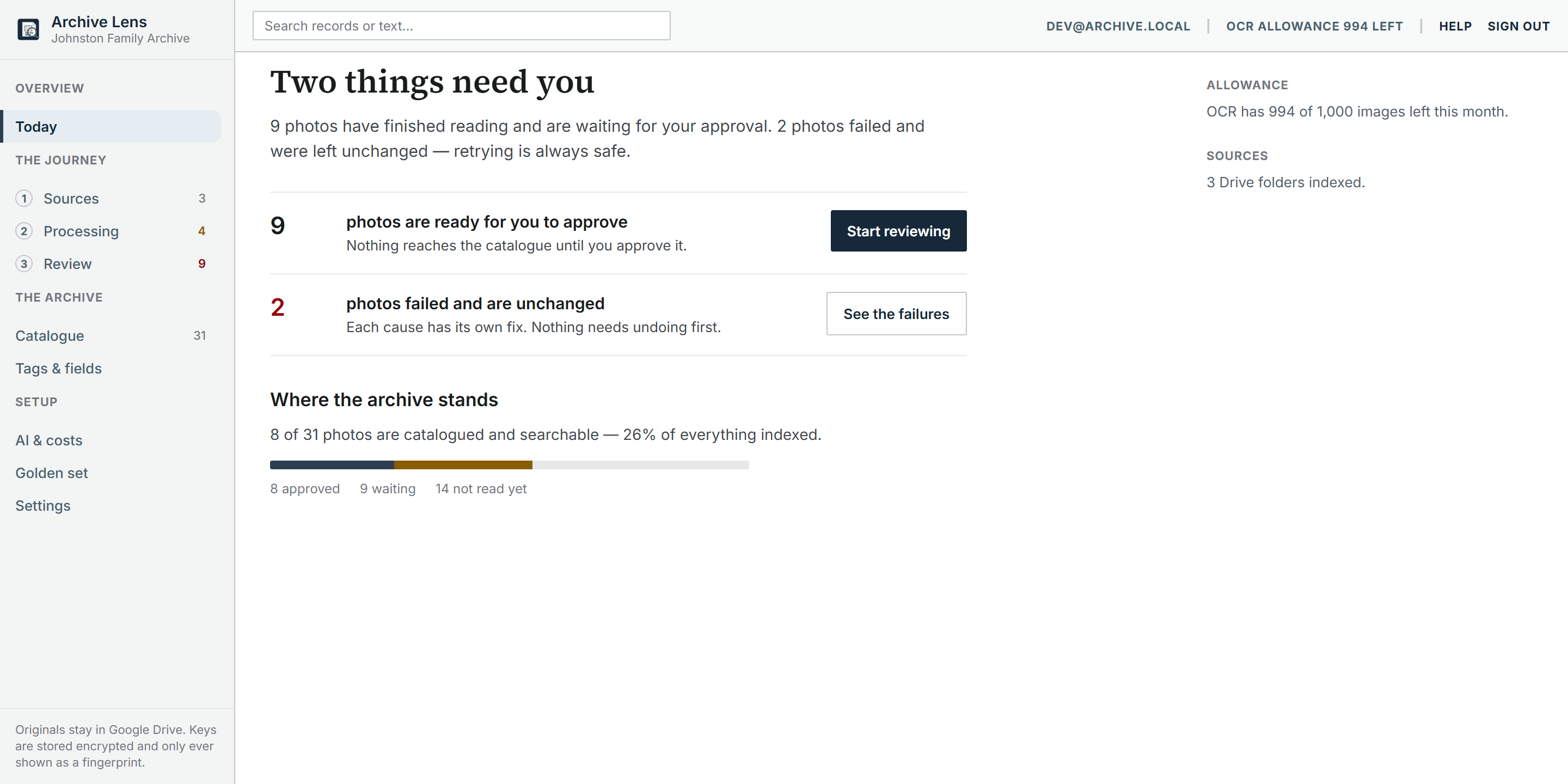
- Designed and built a catalogue over her Google Drive archive, where OCR reads each card, AI suggests fields on her own key and a person approves them.
- The call
- I kept the originals in Drive and made every AI suggestion wait for a person's approval.
Easier to watch than to describe
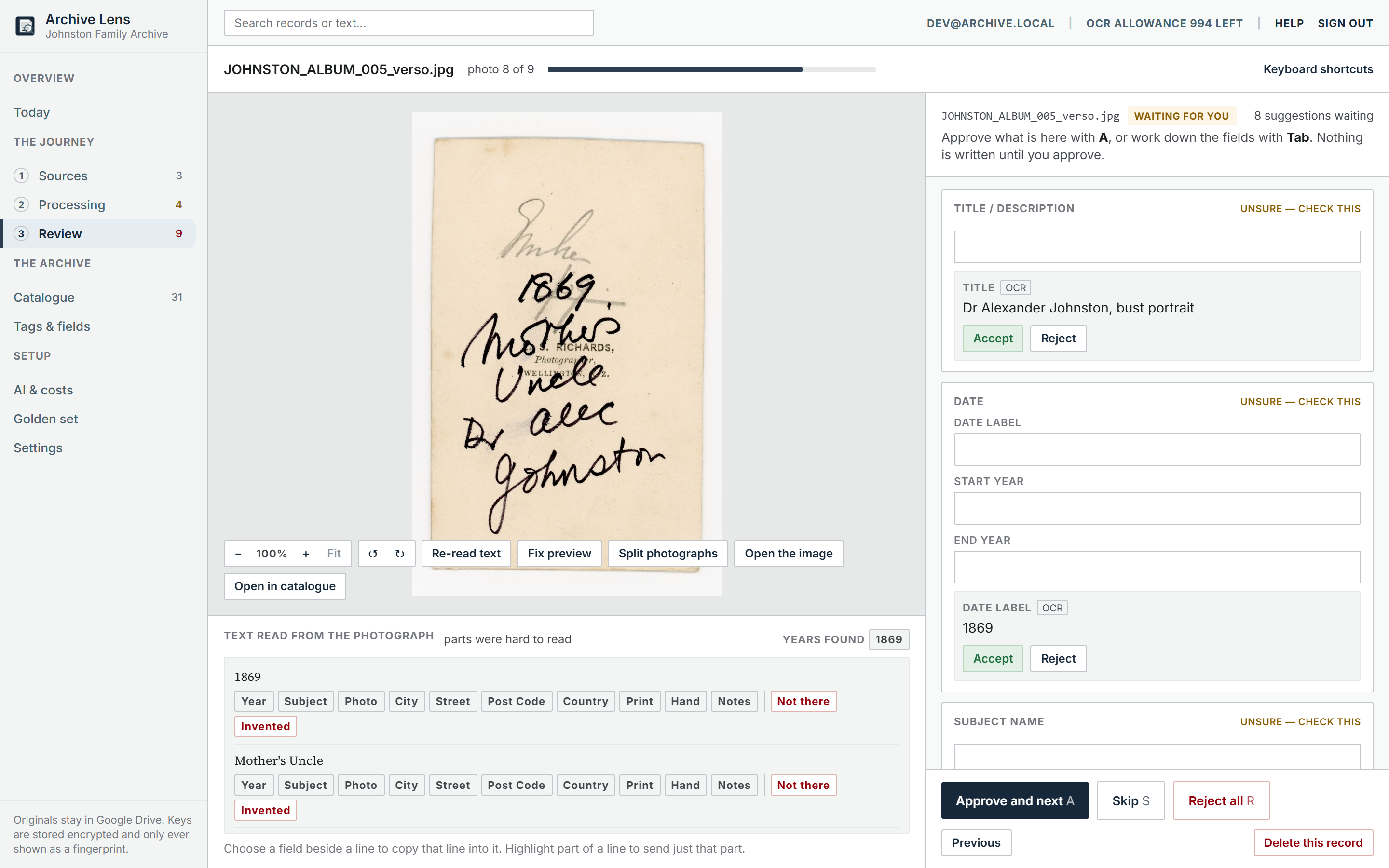
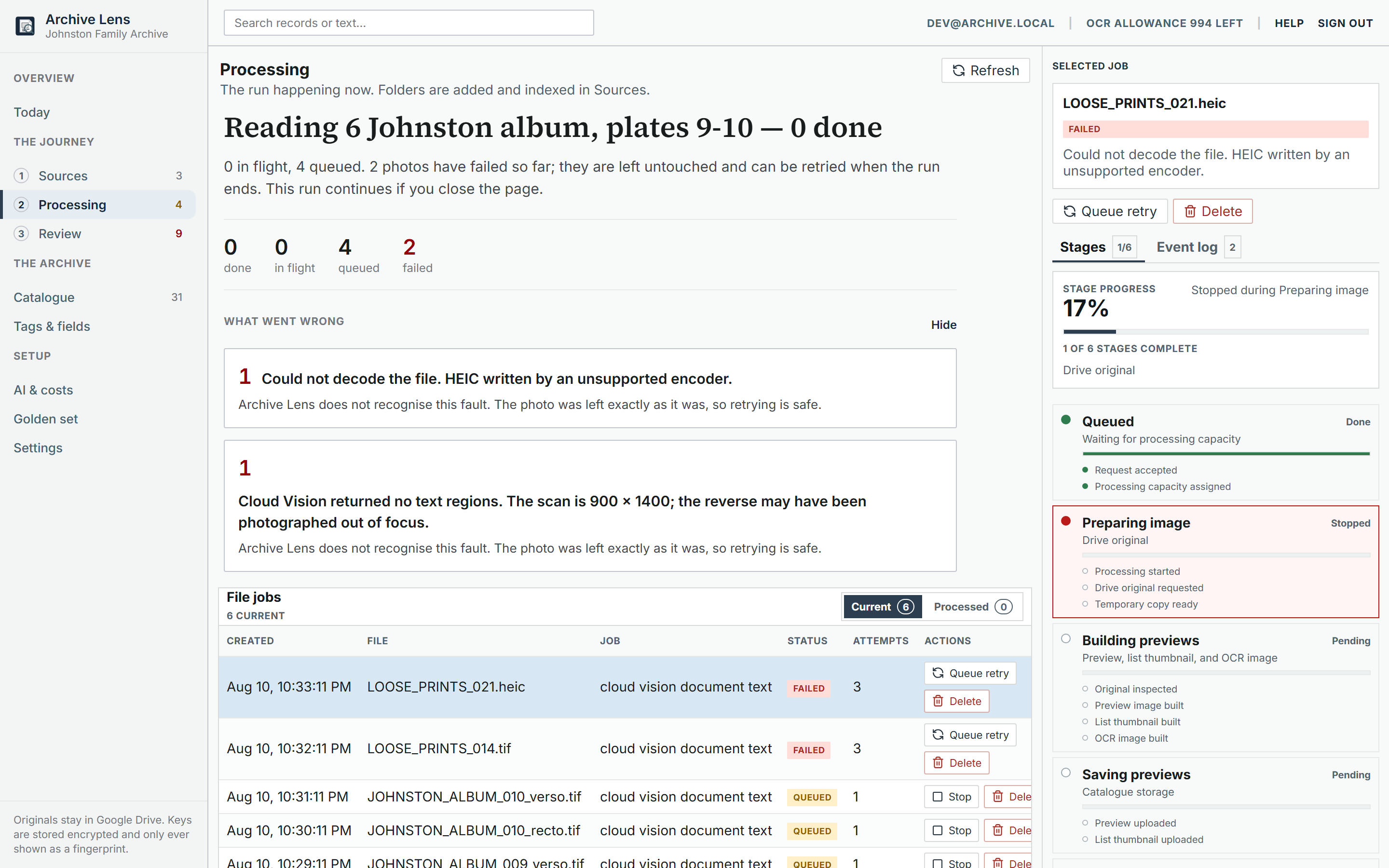
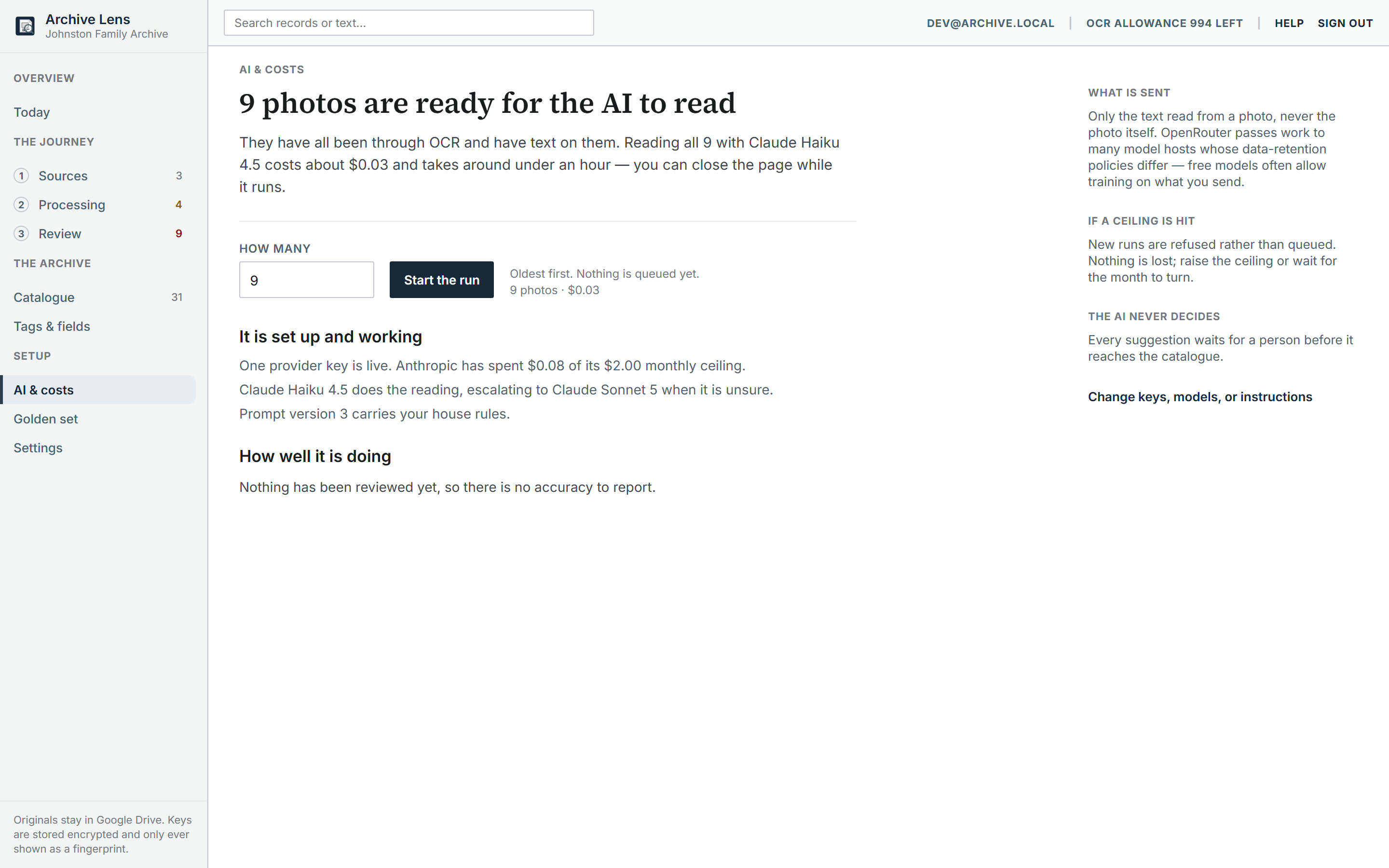
Eight screens, no sound, thirty five seconds. Today, the Drive folders being watched, a run in flight with two failures explained, a photograph reviewed from its back with the front a click away, an album page boxed into four photographs, the catalogue, a search matching a studio mark read off a card, and AI spend against its ceiling.
Built from the product's own screen captures rather than a screen recording, so it re-renders identically every time the interface changes.
From local experiment to hosted product
I started with local OCR extractors and a local worker, to keep processing next to the files. The OCR quality was inconsistent, and the setup was far too technical for the person who would use it. So I dropped the idea of a Windows application and moved to a hosted browser workflow.
Claude and Codex wrote the code. I decided the scope, reviewed what they built and tested it.
Four decisions define the product
The boundaries- 01
Originals stay in Drive
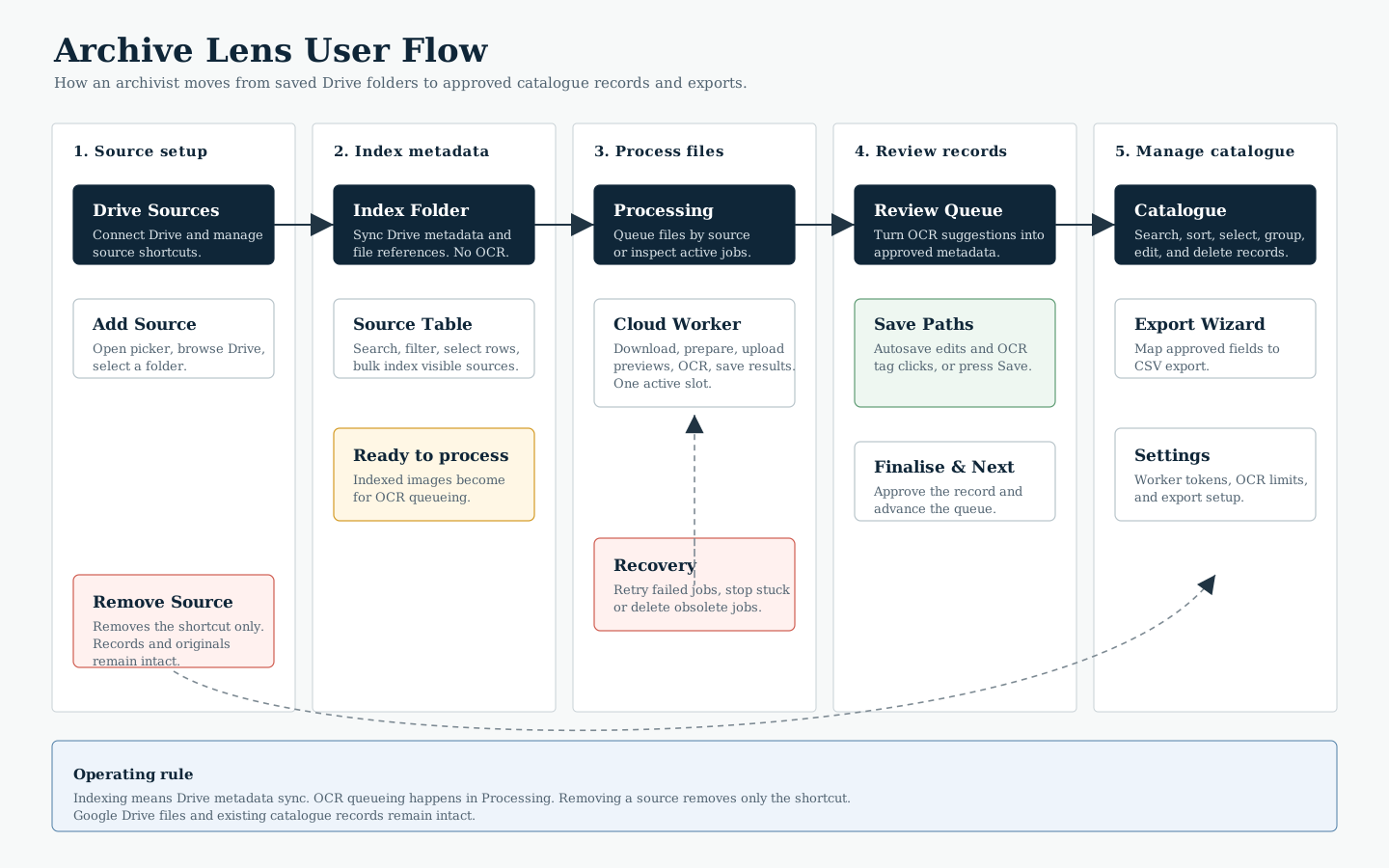
Archive Lens stores Drive references, derived previews, read text, metadata and review state. It never makes a second full resolution copy. The worker downloads an original into temporary storage, derives what it needs and deletes it. Drive remains the source of truth.
- 02
Indexing is not processing
You can index and browse Drive files before deciding what to process. Nothing quietly consumes OCR quota, processing time or storage just because it exists in a folder. A run admits as many photographs as the month allows and says how many it left out.
- 03
Machine output is a suggestion
OCR reads the text. An AI pass turns that reading into names, places, dates and studios, and can describe the picture. None of it becomes catalogue data until a person accepts, corrects or ignores it, and nothing a person approved is ever overwritten by a machine.
- 04
AI runs on your own key
There is no platform key, so AI spend never lands on me. A workspace adds its own provider key and a monthly ceiling that blocks rather than warns. Sending the picture itself is off until someone switches it on, and then only a small derived copy leaves.
The workflow as it stands
Connect Drive, index a folder, process as many photographs as the month allows, review each one front and back, and export what has been approved.
What the AI pass does
Built, not yet provenCloud Vision reads the text on a card. It doesn't know that "S. Richards, Photographer, Wellington" is a studio, a photographer and a place, and the AI pass is there to work that out. It takes the reading, the filename, the folder and the archive's own vocabulary, and suggests a title, subject, photographer, studio, place and date, each with a confidence. Review treats every suggestion like a line the OCR read, so a person can accept, correct or ignore it.
The text pass sends no image and is the cheapest call in the system. Describing the picture is a separate pass that sends a 384 pixel copy, and it stays off until the workspace switches it on. A cheap model answers first and a stronger one is only asked when the first is unsure. Before a large run starts it shows the estimated total, and once spend reaches the monthly ceiling further calls are blocked.
All of this is built. It hasn't run over the real archive yet, so nobody knows how often it names the right studio or invents a date. Measuring that starts in the lab below.
Where the AI gets tested
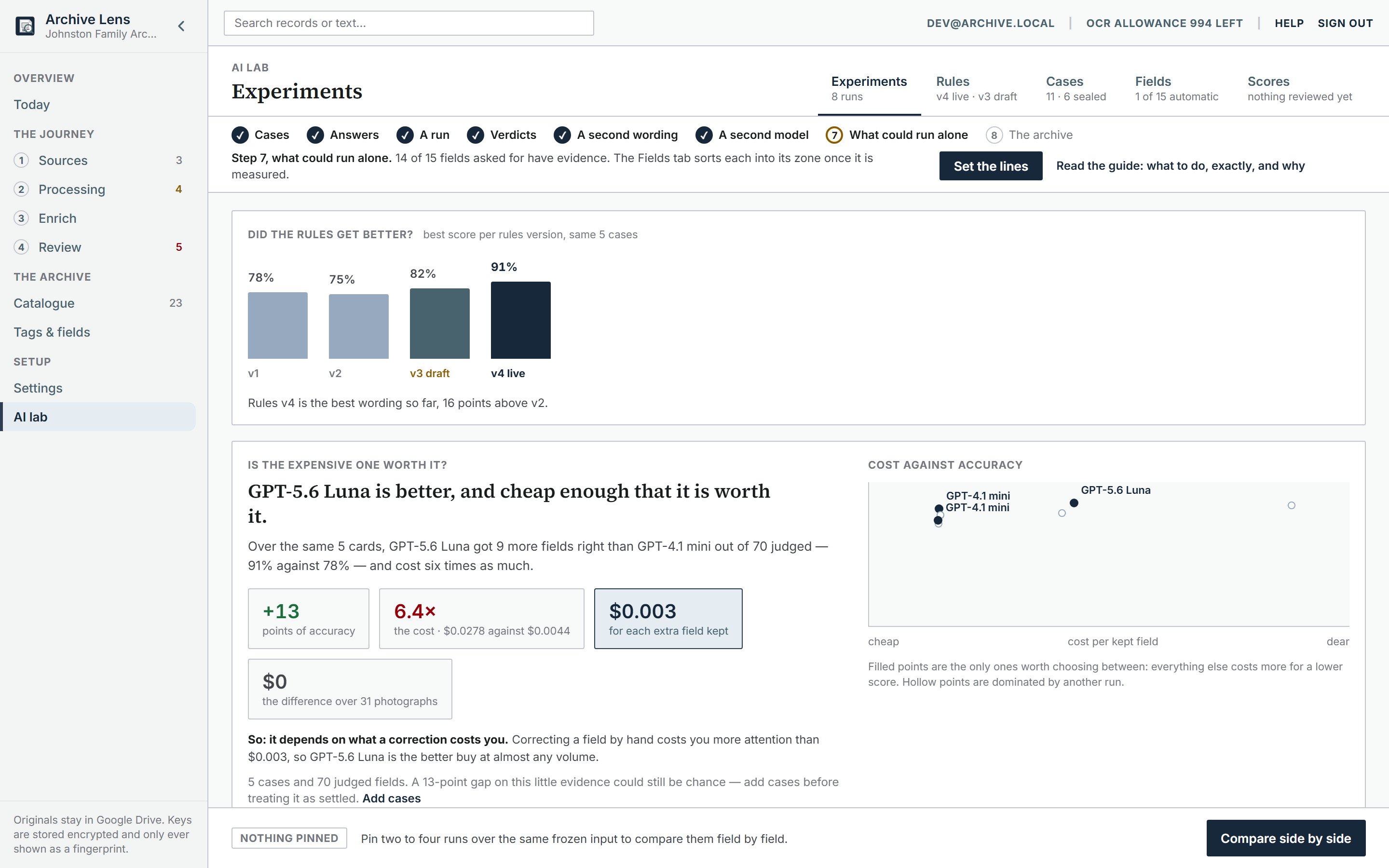
September 2026The AI lab tests the rules the model follows before they reach anyone's archive. A case is a public-domain card with its text frozen and the right answers approved by hand. A run sends those cases to one model under one version of the rules, and each field it fills gets marked right or wrong.
So far that's five cards and eight runs, across four models and three wordings of the rules, for 14 cents in all. Five cards is far too few to trust a score, and the screens say so. The model answers below are real. Only five fields have been marked by hand, so a matching rule marked the rest for these screenshots.
What the research added
August 2026After three months with one real user I couldn't tell which of her habits came from the hobby and which were her own. So I read the guides people follow to identify old photographs, the forums where they get stuck and the complaint threads about the tools they leave. Six changes came out of that reading, and all six are built.
Search forgives spelling, because names on the back of a card are rarely spelt the way the family spells them now. Filters show which records still lack a place, a date or a subject. Review can be narrowed to one folder, since every guide says to work one box at a time. Shared fields can be set across many records at once. And every photograph gets a perceptual fingerprint, so review says when one looks like a print already catalogued.
The biggest was the back of the photograph. Every guide treats the front and the back as separate evidence, the picture on one side and the studio stamp, tax stamp and handwriting on the other. Until then the app had no idea a back existed. Now a back is its own file with its own reading, paired to its front, and review shows both sides as one record.
Next I want to watch her review sessions and shape review, search and export around what she does in them.
Decision log
Newest firstThe mistakes in this log are about building the wrong thing, or the right thing at the wrong time. I built a Windows app the user could never have run, and a golden set scorer nobody opened. Batch pricing went in a month before there was any volume to discount, and the research I did in August belonged in May.
Each entry is a release that carried a product call, tagged with how it turned out. The "got wrong" lines are the most useful part.
- Wrong time
The database boundary stopped being optional
Since August the database itself decides which archive a request may touch. That was rolled out behind a switch, off by default, on purpose. Staging first, watch for a wrong policy, then production. The staged part was right. Leaving the switch optional afterwards wasn't. An audit of the code found that nothing stopped a hosted deploy from quietly running with the boundary off, and nothing recorded which environments had it on.
So it's no longer a choice anywhere people can reach. A hosted copy of the app on Postgres refuses to start unless the database enforces the boundary. Both environments already had it on, which took a manual look to find out. The same audit fixed a worker that had been failing every fingerprint job for want of one parameter, and the browser tests now run the real worker against the real API so a miss like that can't pass twice.
Got wrongThe rollout switch was left as a permanent option. A default that says off proves nothing about what's deployed, and I had no way of knowing without going to look.
- Wrong thing
The AI had four screens and no front door
Turning it on, paying for it, judging it and tuning it were spread over four screens, with two buttons that started a run and two tables scoring the same thing. Nothing anywhere said where the results appear. Two different people were sharing those screens. Someone enriching their own archive needs four steps in a line. Whoever decides what the archive sounds like needs a workbench, and that's a different job.
So they were split. Enriching became a numbered step between processing and review, ending with a sentence saying the suggestions wait in review. The rules the model is given stopped being source code and became something a person can edit, try against prepared cases, and publish when it's better. Only a named account sees that, and the rest of the archive never learns it's there.
Got wrongThe second run button had never worked. It sent a request the server refused, and because the first button worked nobody noticed, including the test written to cover it. Removing the duplicate was the fix. The same week showed the repository wide check had quietly stopped running on the machine it was meant to protect, which hid a real fault underneath it.
- Right thing
The demo learned the back of the card
The rig now pairs each back to its front the way review does, the case study says what the AI pass does, and the flow diagrams show the passes after OCR rather than in place of it. This log started the next day.
- Right thing
Five rounds on one sentence
The duplicate scan said every photograph had already been fingerprinted while thousands had none, three times, each time for a different reason. Each fix had added a skip without adding the number that made it visible. The answer was six counts that partition every un-fingerprinted photograph, so the all-clear can only appear when it's true.
Got wrongTwice more on the way. A worker timing out looked like an unreadable photograph and would have retired it for good, and "retry the failed ones" was retrying everything.
- Right thing
Six features, one wave each
Search that forgives spelling. Thin-field filters, because the backlog matters more than the done pile. One folder at a time in review. Bulk edit through the same per-field chokepoint as hand editing. A perceptual fingerprint for every photograph. And the back of the photograph as its own file, paired to the front, with review showing both sides of one record.
Got wrongWidening the search projection changed what the archive displayed, and on Postgres seven fields silently stopped being searchable while the SQLite test database kept finding them. Fixed by splitting display from search into two columns and covering each field on Postgres.
- Wrong time
Found out who the user actually is
Three months in, the feedback from one person was thin. Not because the product was fine, but because she's one person with a life. I couldn't tell her habits from the hobby's. So I read the guides, the forums and the complaint threads of the tools people leave, and treated that as the second user. Six features fell out, and the plan started with refactors, because the review-queue rule existed in five copies and the filter block in three.
Got wrongI waited for feedback to arrive instead of going to get it. The research should have been done in May.
- Right thing
Postgres enforces the boundary, and one visual system
Workspace isolation moved into the database itself, with proofs in CI and the real sign-in paths run against the real policies. Every commit is now scanned for leaked secrets. The legacy stylesheet was deleted, and a third audit closed the pieces the redesign left behind.
- Right thing
The product photographs itself
A rig seeds a throwaway archive from public-domain cartes de visite, walks eight screens and saves them. A silent video is built from those stills. A screen recording drifts and goes stale. This re-renders identically whenever the interface changes, and it lets people see the product without needing the first user's time.
- Right thing
Nine things raised from real photographs
The first user's cards were sideways, held scanner marks read as letters, and one album page carried four people's captions in one record. So, turn a photograph, mark a read line as not on it, re-read it for real, fix a sideways preview without paying for a read, and split a page into records of its own.
Got wrongThe re-read matched the cache on the Drive checksum, which a turn never changes, so it would have returned the same sideways text and spent nothing. And the worker never asked for those two job types, so they were created and never claimed. Both found by trying it.
- Right thing
Redesigned from a written brief
A brief for AI design tools set the hard rules first. Originals never leave Drive, machines suggest and a person approves, and no layout shift for transient controls. The interface was rebuilt to the result in one commit. Notes became rows the same week, each remembering which reading it came from.
- Right thing
A user is a user
The admin role was removed rather than secured. Each person owns a private workspace, so there was nothing for an admin to be admin of. The same day, a cap on how many photographs one press can queue, and security headers from the web app.
- Right thing
A fourth provider, scoped narrower on purpose
OpenRouter for free-tier trials. Text only, with no code path that can send an image, no batch, and a live model catalog because the free tier rotates too fast to seed. Its routing can't promise zero data retention, so the credential card says so in plain words instead of forcing every request through the few hosts that can.
- Wrong thing
Deleted what nobody could reach
An audit removed the golden-set scorer, the single-image extract endpoint, two superseded endpoints and an unused shell. Each removal is recorded with why, and the batch code that stays is recorded as kept on purpose, so the next audit doesn't flag it as forgotten.
Got wrongThe golden-set scorer was a whole feature built to answer a question the accuracy report already answered. Nobody opened it. The set itself came back with the August redesign, as a list of photographs someone vouched for, and its screen says plainly that the comparison run doesn't exist rather than showing a dead button.
- Right thing
Every failure gets a reference
Deleting a record now clears every child row and every thumbnail. Every API error shows an id, browser crashes report themselves, and Settings lists what was recorded. Built because "it did not work" from a non-developer is a dead end without something to quote.
- Wrong time
AI on the user's own key, built in a day, parked in two
An AI pass turns the reading into fields. No platform key exists, so spend can only ever land on the workspace. Text first, because that's where the fields come from. The description pass sends a 384 pixel copy and is off until switched on. An estimate before a run, a ceiling that blocks, and an accuracy report afterwards.
Batch APIs for all three providers were built the same day and deliberately not wired two days later, with the trigger for revisiting written down. Half price is real money at volume, and this archive isn't volume.
None of it has been run over the real archive yet. The accuracy report and the golden set exist to measure it, and that measurement is still ahead.
Got wrongBuilding the batch path before there was anything to discount. Two days of work that the plan for one user never needed. And a month later the pass is still unproven on real cards, which is the only proof that counts.
- Right thing
Made it safe before it could be shared
A security review before a second person touched it. Private workspaces with assets repaired to their real owners, Drive sign-in bound to the browser and single use, deny-all row security on operational tables, and the local worker prototype deleted rather than kept as a second boundary. Production stayed untouched until staging proved it.
- Wrong time
Put it down and built something else
The MVP was in the first user's hands. It was her idea, and she's hard to get time from, so waiting for feedback would have meant weeks of nothing. I went and built Resume Builder instead and let Archive Lens sit until there was something to react to. Eight weeks without a commit, on purpose.
- Right thing
A dense workbench, not a brochure
A design contract from Stitch, three panes, full-text search, and browser history that follows filters and the selected record. The rule written down then still governs the interface. Operational, restrained, and it always says what happened and what to do next.
- Right thing
Processing became a cost decision
Cloud Run workers download an original into temporary storage, derive a preview and an OCR image, call Cloud Vision, and delete the download. The last Tesseract path was removed on the 10th.
A monthly cap of a thousand reads, configurable, and the option to bill OCR to the user's own Google key. Indexing a folder was separated from reading it, so nothing spends quota just because it exists.
- Wrong thing
Started local, left the same day
Three OCR engines compared on real cards, a local worker, a local review screen. The readings were inconsistent and the setup needed a developer. A hosted deploy was configured before the day was out.
The call that outlived everything else was made here too. Originals stay in Google Drive, and the app only ever holds references and derived copies.